
Hello.
I am a
I'm Sanjeev Kumar
Specializing in Windows Server Administration, Networking, Cloud (AWS & Azure), Firewall (Fortinet), and Cybersecurity. I build reliable systems and help teams ship fast and safe.
Who am I?

About Me
Sanjeev Kumar's Details
I am an IT Engineer with proven expertise in Windows Server administration (AD, GPO, WSUS), network troubleshooting, cloud server management (AWS and Azure), and firewall configuration (Fortinet 60F).
Skilled in leveraging AI technologies to build no-code applications, automate workflows, and enhance business processes. I specialize in building stable, secure, and well-managed IT environments that help teams work faster, safer, and with fewer disruptions.
Skills & Tools


.png)







Featured Projects
Enterprise AD & GPO
Planned and implemented a Windows Server 2016 Active Directory environment. Set up OU design, user access policies, GPO configurations, and WSUS for 120+ endpoints. Configured Acronis Backup for disaster recovery.
Fortinet 60F SD-WAN
Designed SD-WAN on FortiGate 60F to enhance network performance. Integrated two ISP connections (Jio & Spectra) with load balancing and automated failover. Applied firewall rules, IPS/AV profiles, and VLANs.
AI Cost Sheet Builder
Built a no-code web application at Grain Milling Solutions using Lovable AI to automate cost sheet generation. Includes logic for tax calculations, Excel/PDF exports, alongside Resume Builders and Notes apps.
GMS Website Redesign
Took complete ownership of managing, designing, and updating the company website (www.gmsdelhi.com). Transitioned the platform from a third-party vendor to a fully in-house operation.

Certifications
Click any card to view the certificate.

Networking Basics
IPv4/IPv6 Addressing, Subnetting
View Certificate
Cisco CCNA
Network Fundamentals
View Certificate
Microsoft Azure
Fundamentals
View Certificate
Google Cloud
Trust & Security
View Certificate
Computer Networking
Basics of Networking
View Certificate
Advance Cyber Security
Threats & Governance
View Certificate
MCSA
Windows Server Admin
View Certificate
Fortinet Networking Fundamentals
Network Security
View CertificateExperience
IT Engineer

Apr 2024 – Present · Noida
Promoted from Desktop Support Engineer to IT Engineer based on technical expertise and performance.
Key Responsibilities
- Managing office IT infrastructure and day-to-day technical operations.
- Providing remote IT support to factory locations and external clients.
- Administering Windows Server environments including Active Directory and Group Policy.
- Managing network infrastructure including VLAN, DHCP, DNS, and IP management.
- Configuring and maintaining Fortinet FortiGate 60F firewall, VPN, and security policies.
- Monitoring and managing cloud infrastructure on AWS and Microsoft Azure.
- Handling company website management and technical updates.
- Developing AI-based applications and automation solutions for business operations.
- Implementing cybersecurity practices including patch management and endpoint protection.
- Coordinating with vendors, ISPs, and internal teams for efficient issue resolution.
Desktop Support Engineer
Dec 2023 – Mar 2024 · Noida
- Provided technical support for desktops, laptops, printers, and office IT infrastructure.
- Troubleshot network connectivity issues, system errors, and software problems.
- Assisted users with installations, system configuration, and troubleshooting.
- Maintained system performance and ensured smooth daily IT operations.
- Supported factory and office users with remote troubleshooting and technical guidance.
Career Growth Summary
Let's Connect
Windows Server Domain Setup + GPO Automation + Backup & Recovery
Overview
Designed and implemented a modern enterprise-grade IT infrastructure using Windows Server 2022 to centralize identity management, strengthen network security, and automate administrative operations. The solution leveraged Active Directory Domain Services (AD DS) integrated with DNS for seamless authentication and name resolution across the organization.
A structured Organizational Unit (OU) hierarchy was created to organize departments efficiently and enable precise policy application. Group Policy Objects (GPOs) were implemented to standardize configurations, enforce security policies, and reduce manual IT effort.
Additionally, a reliable backup and disaster recovery strategy was implemented using Acronis Cyber Protect Cloud, ensuring data protection, quick recovery, and business continuity.
Key Responsibilities & Implementation
1) Active Directory Domain Services (AD DS) Deployment
Configured Windows Server 2022 as a Domain Controller to provide centralized authentication and access control across the enterprise network.
- Installed and configured AD DS and DNS roles.
- Promoted server to Domain Controller with proper domain/forest setup.
- Configured DNS zones for internal network resolution.
- Managed users, computers, and groups via Active Directory Users and Computers (ADUC).
- Ensured secure domain authentication and connectivity.
2) Department-Wise OU Structure & User Management
Designed a structured Organizational Unit (OU) hierarchy based on departmental segmentation to simplify administration and enable targeted policy enforcement.
- Created OUs for departments: Accounts, Costing, CRM, Design, HR, IT, Purchase, Reception, and Management.
- Implemented role-based access using security groups.
- Managed user lifecycle (creation, modification, permissions).
- Delegated administrative control for efficient management.
3) Group Policy (GPO) Implementation
Implemented multiple Group Policy Objects to automate system configuration, enforce security, and standardize user environments.
- USB Restriction Policy to prevent unauthorized data transfer.
- Drive Mapping Policy to automatically connect shared network drives.
- Printer Deployment Policy for automatic printer setup.
- Security policies including password enforcement, login restrictions, and system hardening.
4) Shared Folder & Access Control
Configured centralized file storage with secure access control to enable safe and efficient data sharing across departments.
- Created shared folders on the server.
- Applied NTFS and share-level permissions.
- Integrated access control using Active Directory security groups.
- Ensured controlled and secure collaboration environment.
5) Backup & Disaster Recovery using Acronis
Implemented a comprehensive backup and disaster recovery solution using Acronis Cyber Protect Cloud.
- Configured backup plans for servers and critical data.
- Scheduled daily incremental backups for efficiency.
- Enabled cloud backup for redundancy and protection.
- Tested recovery processes to ensure reliability and readiness.
Key Outcomes
- Centralized user and device management across the organization.
- Improved security through policy-based controls.
- Reduced manual IT workload via automation.
- Enhanced system reliability and operational efficiency.
- Ensured business continuity with a robust backup and recovery strategy.
Project Gallery
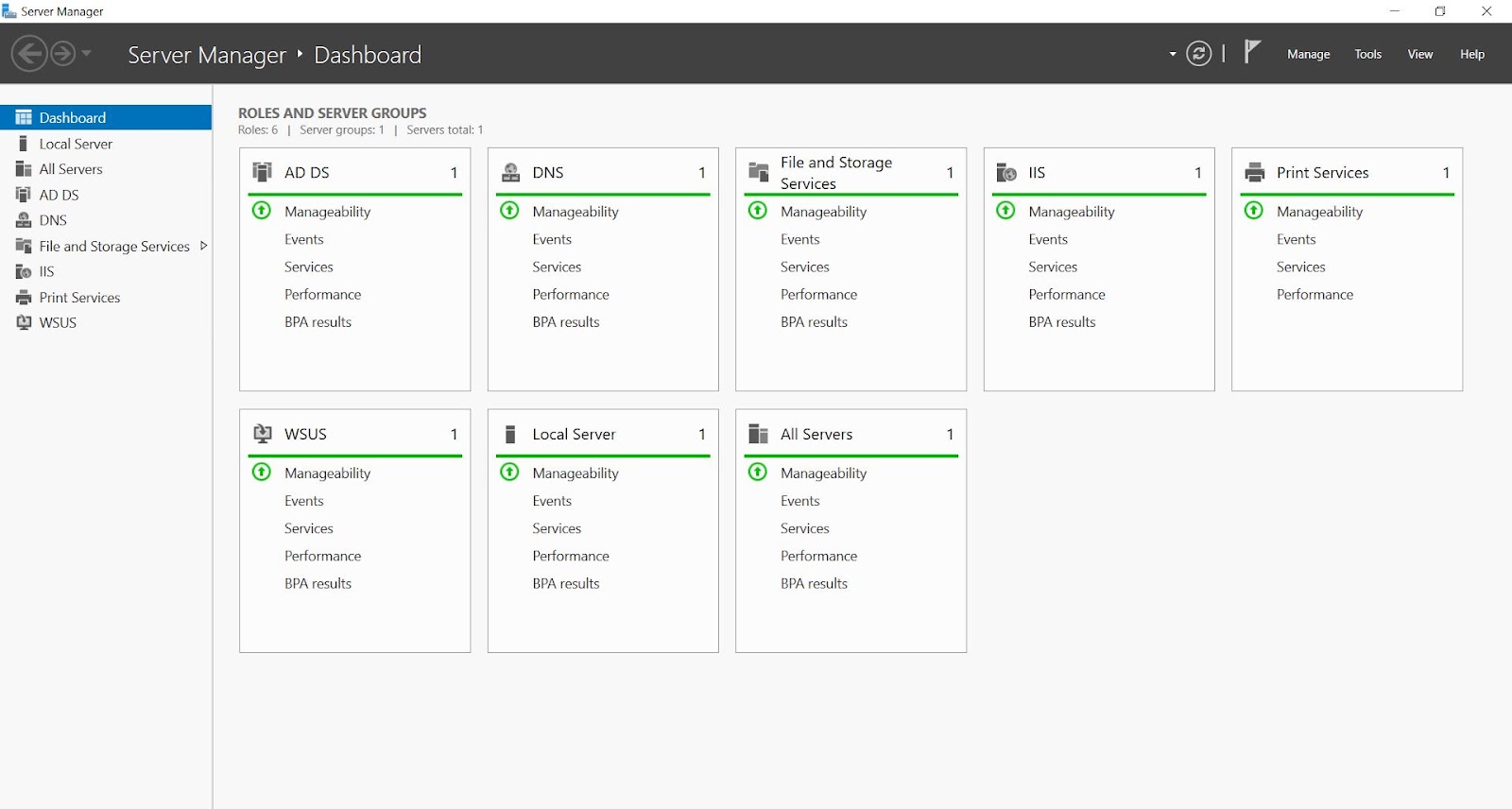
Server Dashboard
Centralized overview of Windows Server roles, local server configuration, and overall system health.
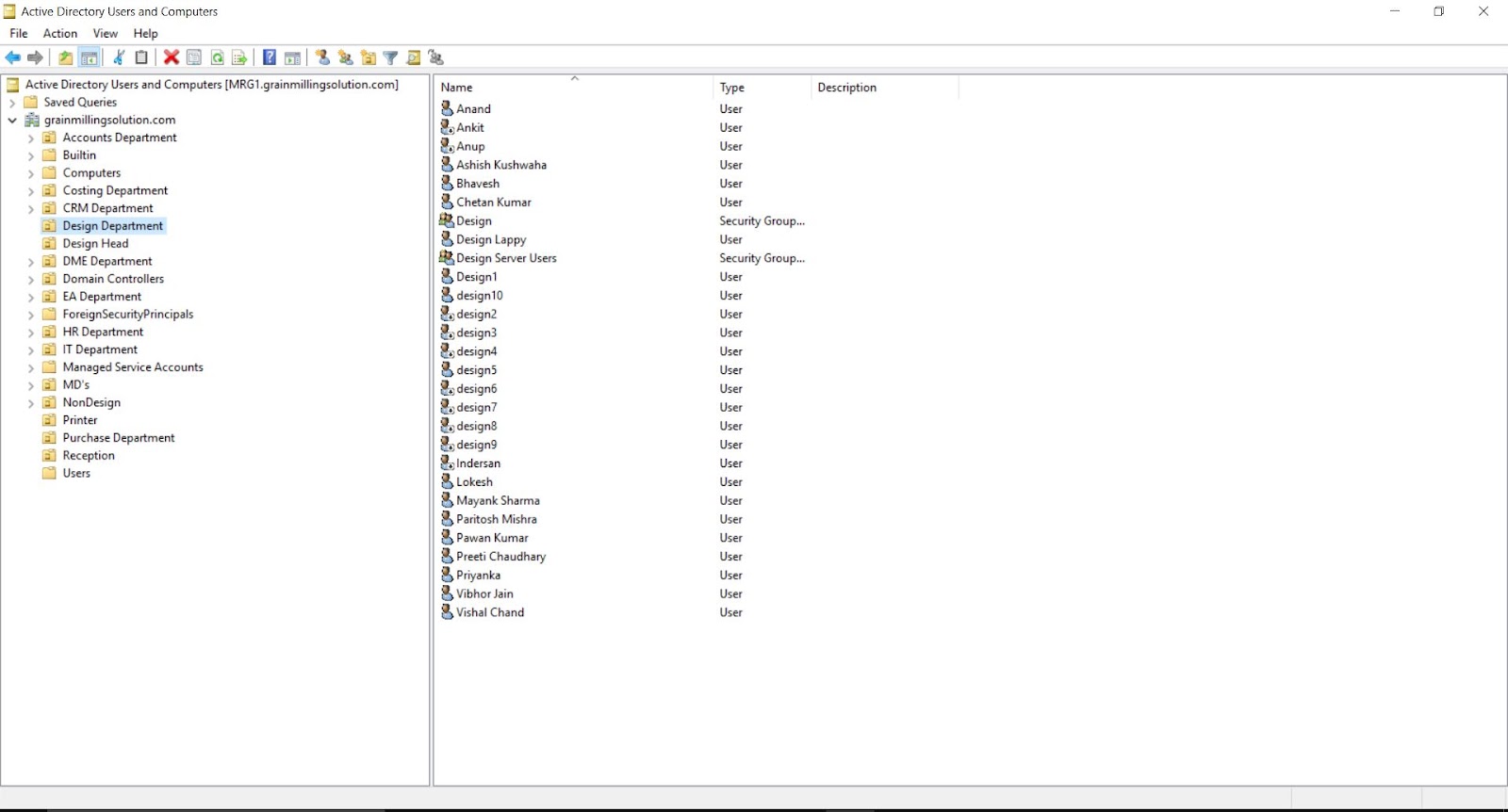
Active Directory Setup
Organized OU hierarchy tailored for departmental segmentation and role-based access management.
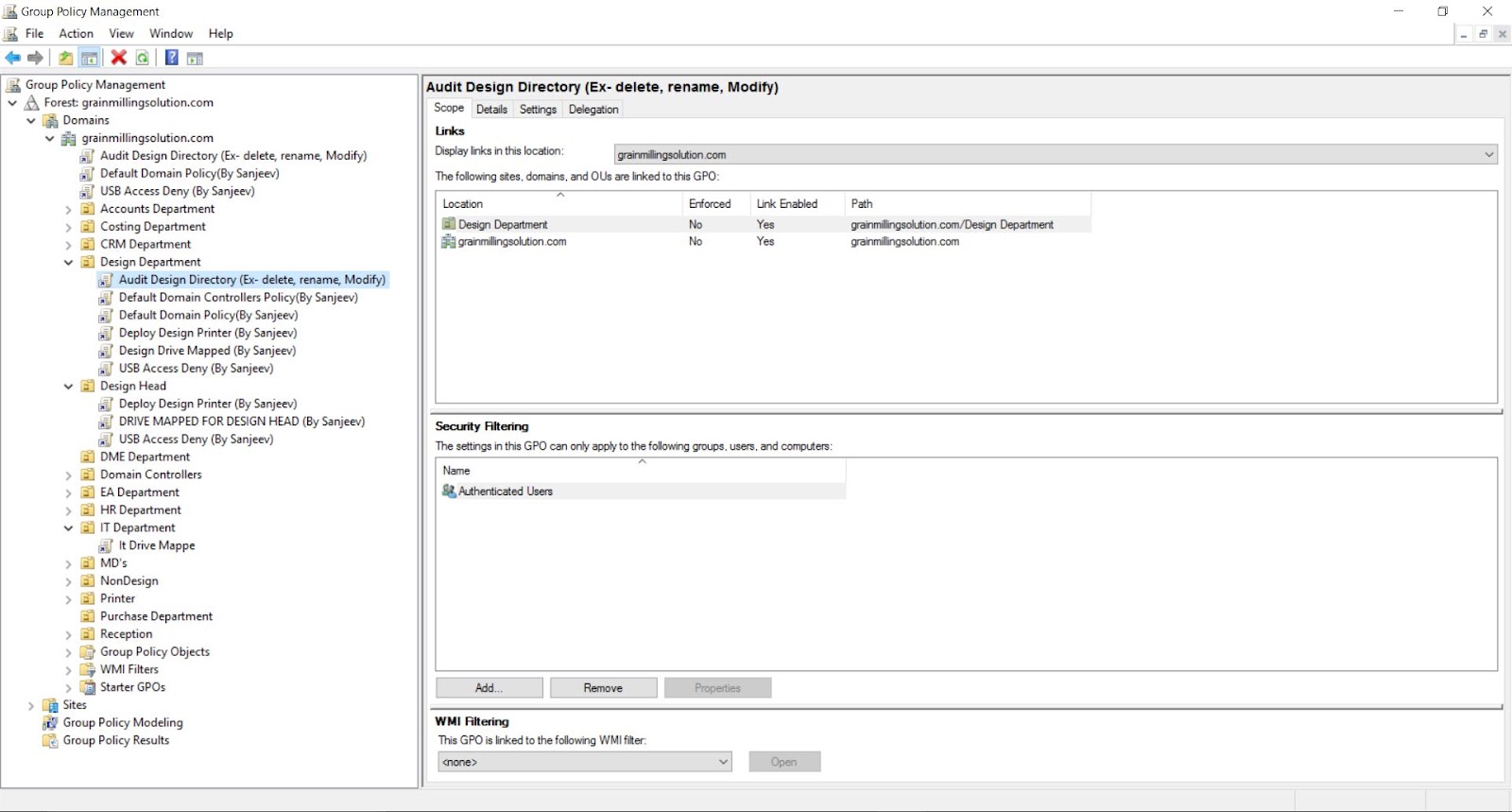
Group Policy (GPO)
Automated rules enforcing organizational security policies, mapped drives, and USB restrictions.
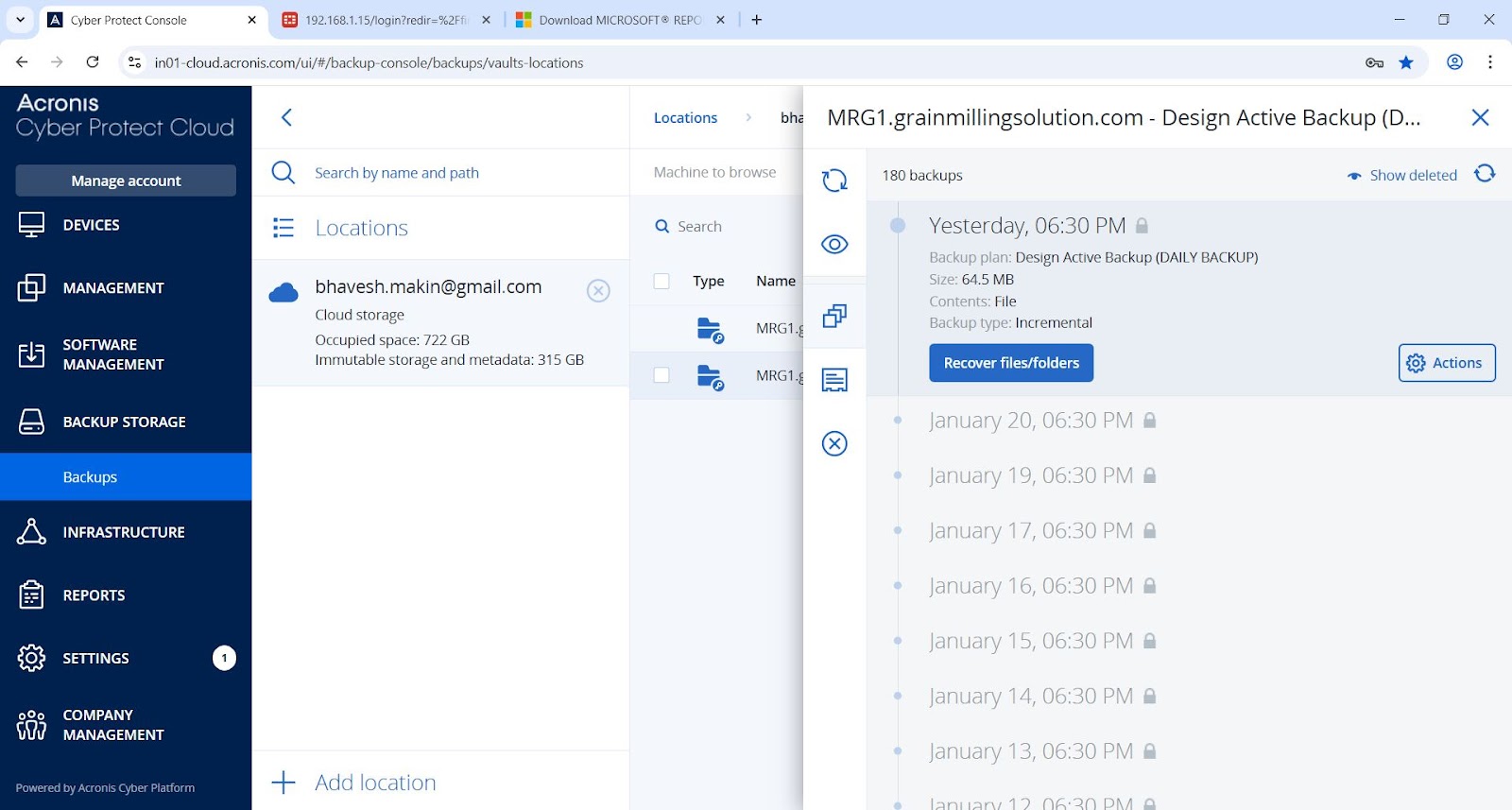
Acronis Cyber Protect
Comprehensive backup plans and disaster recovery configuration ensuring complete data protection.
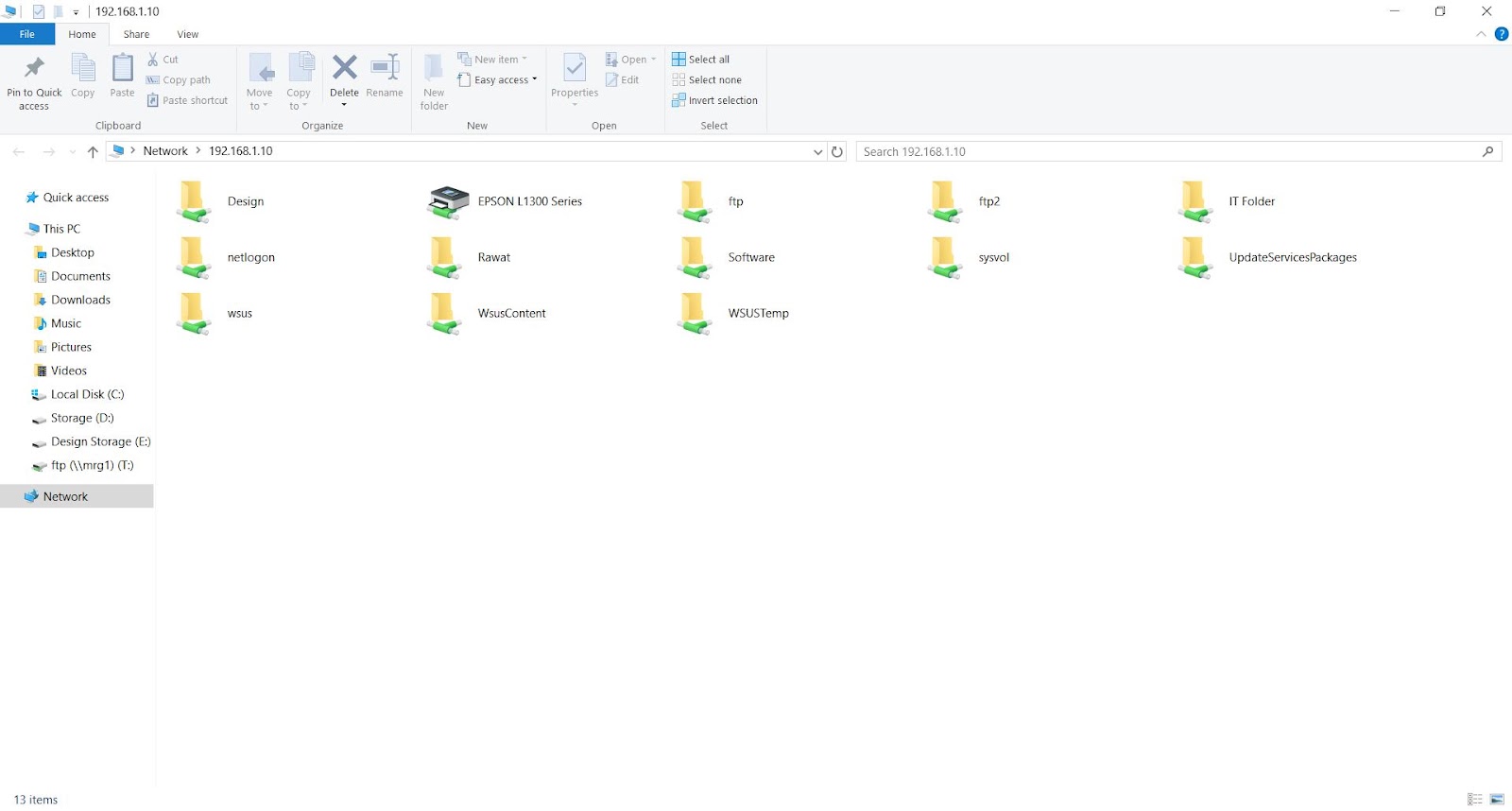
Secure File Sharing
Centralized network storage with strict NTFS permissions applied via Active Directory groups.
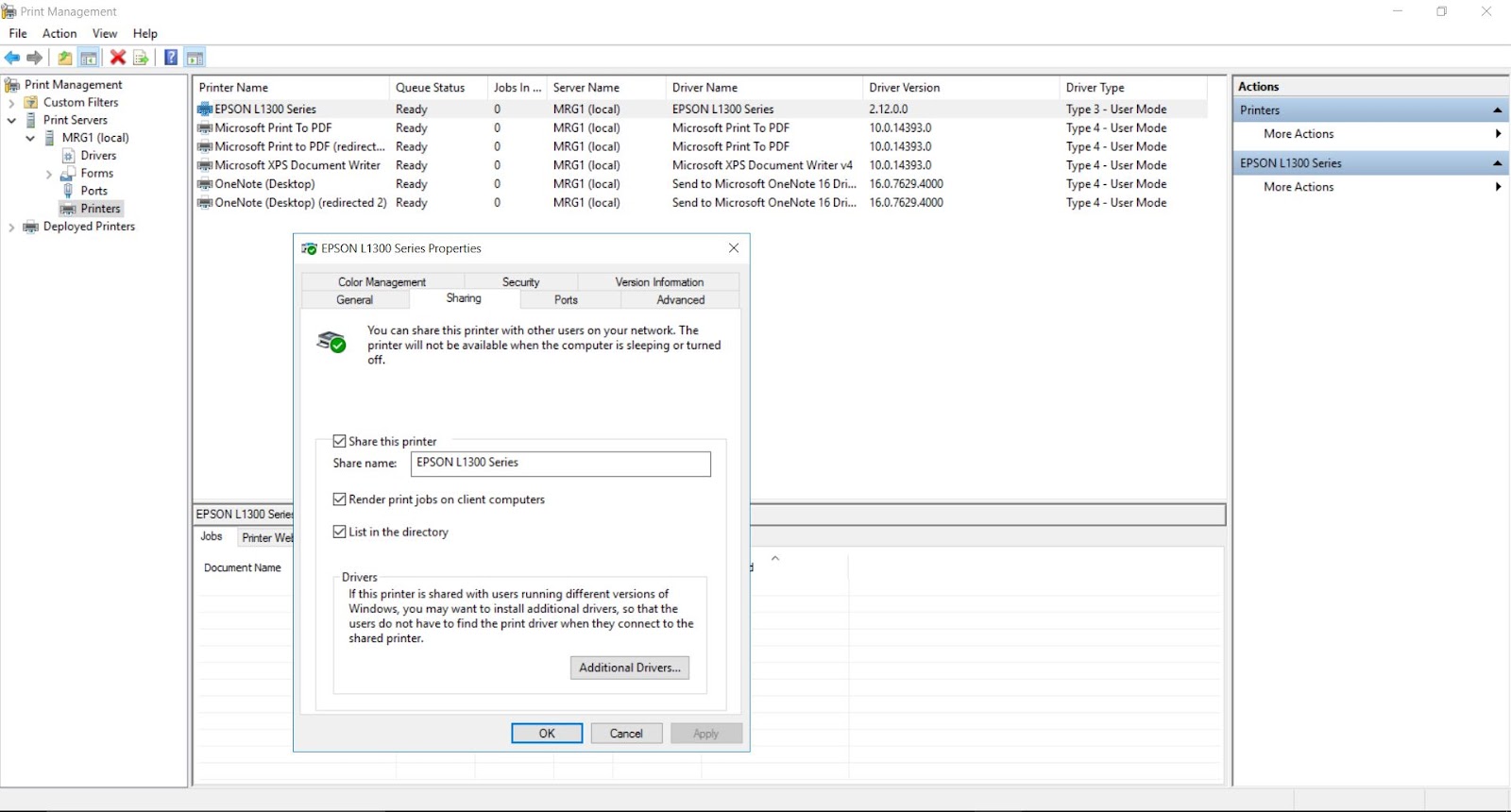
Print Management
Enterprise print servers set up and mapped automatically to designated departmental users.
Fortinet 60F SD-WAN Deployment
Overview
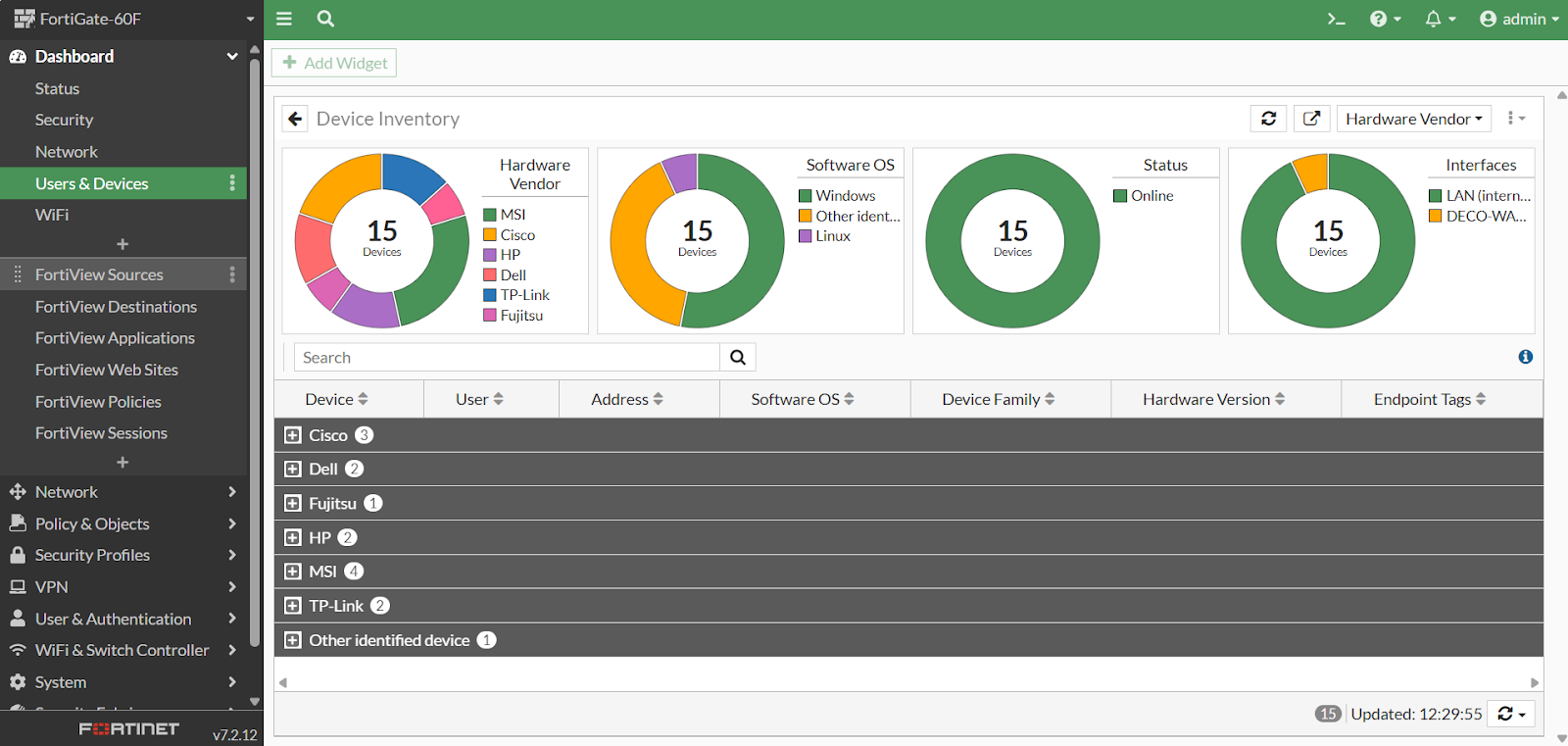
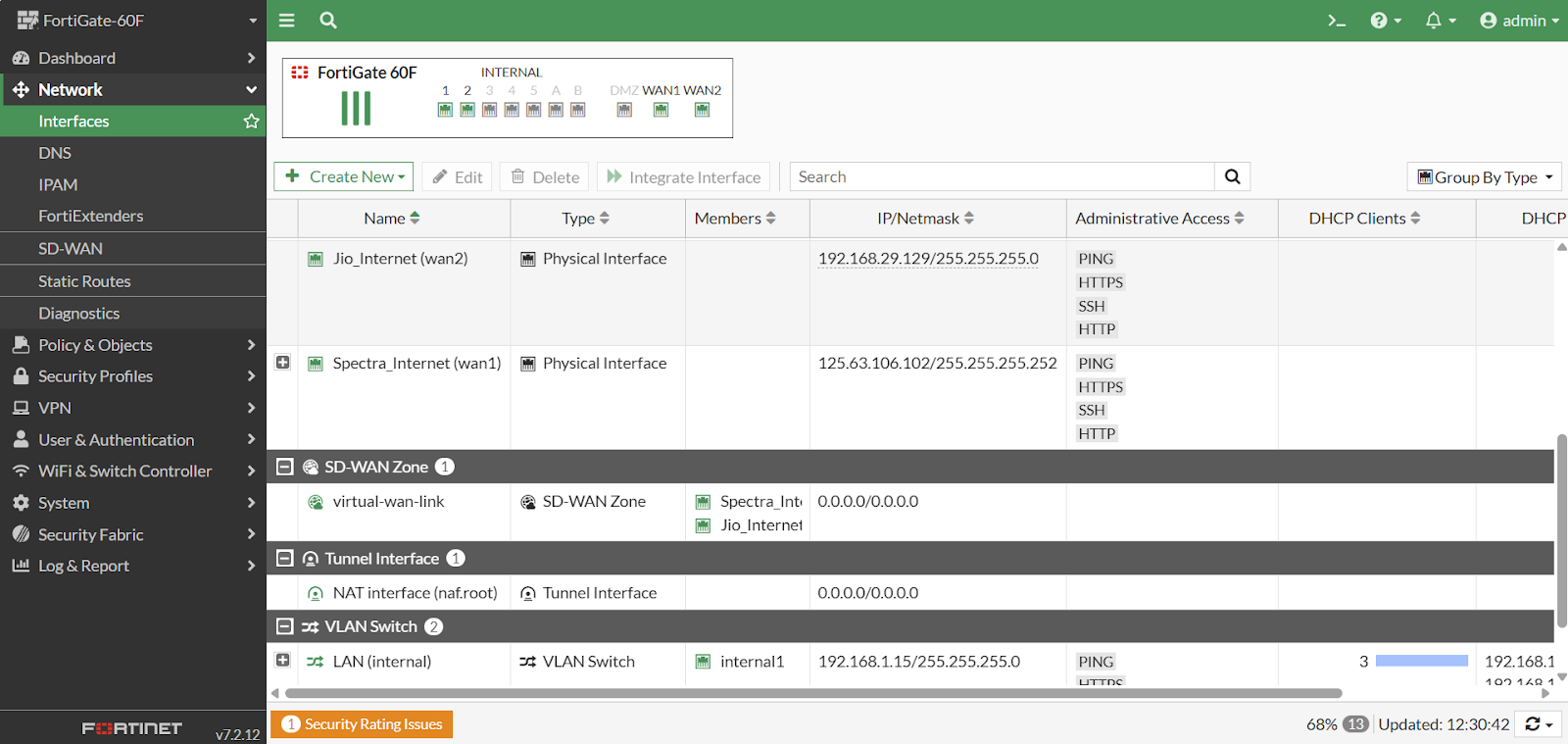
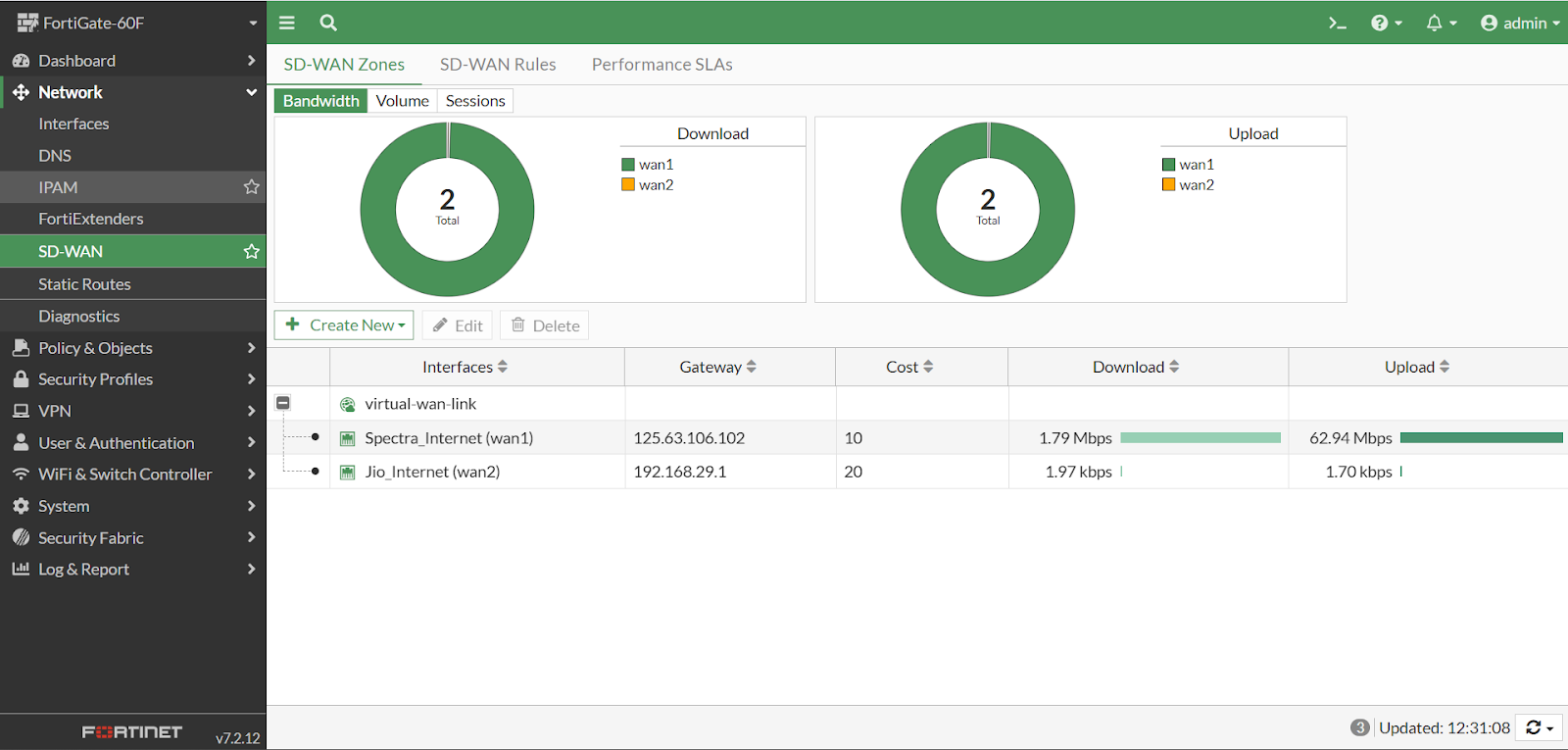
Configured and deployed a FortiGate 60F firewall to secure the company network and improve internet reliability. The key focus was implementing SD-WAN to manage two ISP connections (Jio & Spectra) for redundancy and load balancing.
Key Implementation Details
1) SD-WAN Configuration
Integrated multiple ISP links (Jio Fiber and Spectra) into a single logical interface using SD-WAN. Configured rules to route business-critical traffic through the most stable line and enabled automatic failover.
2) Security Policies
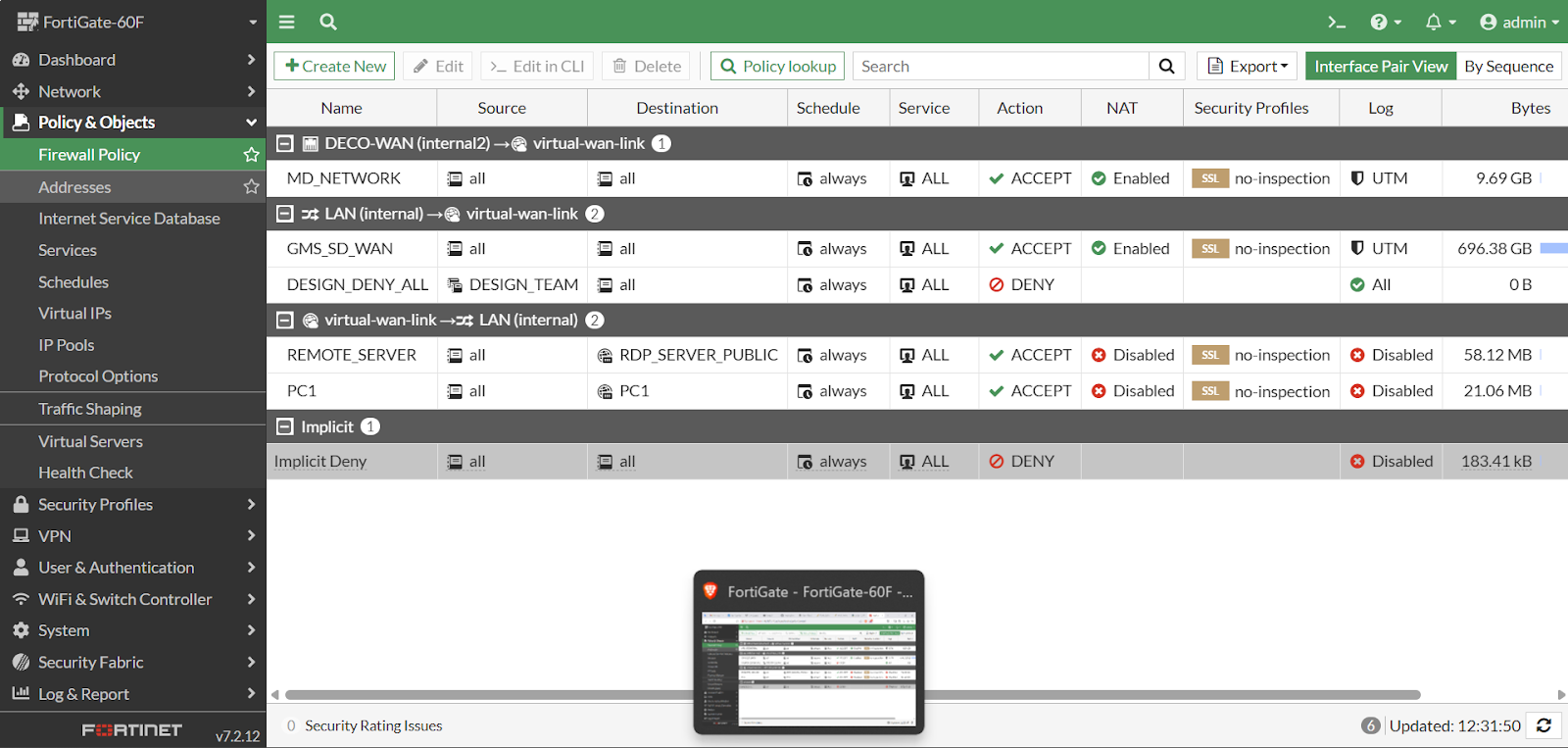
Applied strict firewall policies to control traffic flow between internal VLANs and the WAN. Enabled Web Filtering and Application Control to block non-business websites and risky applications.
Project Gallery
AI Cost Sheet Builder & Other Apps
AI Cost Sheet Builder
Built a no-code web application at Grain Milling Solutions using Lovable AI to automate cost sheet generation. Integrated secure login, automated calculations, and PDF/Excel export.
Key Features
- Automated Calculations: Automatically calculates total costs, taxes (GST), and profit margins.
- PDF & Excel Export: Integrated functionality to export the final cost sheet as a professional file.
More Lovable AI Apps
Here are some other applications I created using Lovable AI. Click on View App to preview the project inside this page.
BuildResume
An AI resume builder that helps users create modern and professional resumes. Simple, fast, and easy to use for job-ready output.
HappyNote
A clean notes app for writing and organizing daily tasks quickly. Helps users stay productive with a smooth interface.
My Moments
A personal moments app where users can store important memories securely. Includes authentication for privacy and controlled access.
Website Redesign & In-House Management
Overview
Successfully transitioned the company’s primary website (www.gmsdelhi.com) from a third-party web development agency to a fully in-house managed platform. This initiative involved a complete structural redesign, content overhaul, and ongoing technical management to ensure the digital presence aligned perfectly with the company's brand identity.
By taking absolute ownership of the website, I eliminated external dependencies, which drastically reduced operational costs and allowed the company to execute digital updates instantly rather than waiting for vendor turnarounds.
Key Responsibilities & Implementation
1) Complete Website Redesign
Independently redesigned the visual architecture of the website to provide a more modern, clean, and professional user experience.
- Revamped page layouts to improve mobile responsiveness and readability.
- Upgraded brand visuals, typography, and color schemes to match corporate standards.
- Optimized navigation menus to help visitors find services and products faster.
2) Content Strategy & Restructuring
Developed and deployed a comprehensive content strategy to ensure clear communication of company services.
- Rewrote and organized copy across all core pages (Home, About Us, Services, Contact).
- Structured product and service hierarchies for better user flow.
- Ensured all technical information regarding company offerings was highly accurate and easily accessible.
3) In-House Technical Management
Replaced the external vendor workflow with a streamlined internal process.
- Took full control of backend hosting settings, domain management, and CMS configuration.
- Implemented regular security checks, plugin updates, and site backups.
- Saved the company significant capital by eliminating monthly third-party maintenance retainers.
4) Agile Updates & SEO Maintenance
Established a workflow for rapid response to business needs.
- Published new service announcements, banners, and updates instantly.
- Applied basic on-page SEO principles to ensure page titles, images, and descriptions met web standards.
Key Outcomes
- Zero External Dependency: Achieved 100% internal control over web assets.
- Cost Efficiency: Eliminated ongoing third-party vendor charges for maintenance and minor updates.
- Rapid Deployment: Reduced the turnaround time for website changes from days to mere minutes.
- Improved UX: Delivered a faster, cleaner, and more structured interface for business clients.
Live Website Preview
Click the button below to load and explore the redesigned Grain Milling Solutions website directly inside this portfolio.